Search Update: Sunday, 17 May 2026
We updated the PolicyShift.ca search engine. The interface now supports natural language queries. You can interact with the database using conversational English. This update changes how you access political information and Member of Parliament (MP) stances.
Natural Language Processing (NLP) Integration
Traditional search requires specific keywords. Our new system removes this requirement. You can now type full questions into the search bar.
Functional Examples:
- "What does Mark Carney say about gun control?"
- "Who supports the national pharmacare plan?"
- "What is the current stance on housing in British Columbia?"
The system uses Natural Language Processing to identify the intent of your query. It extracts entities (politicians, locations) and topics (policy issues).
Live AI Summaries
Search results now include a live AI-generated summary. When you submit a query, the system performs two simultaneous actions:
- Database Retrieval: The engine searches our internal database for relevant MP quotes and policy documents.
- LLM Processing: A Large Language Model (LLM) analyzes the retrieved data.
The system produces a concise summary based on direct evidence. These summaries prioritize direct quotes from politicians. This ensures the information remains rooted in recorded statements rather than interpretations.
The "Alternative Opinions" Feature
Political transparency requires viewing multiple perspectives. We added an "Alternative Opinions" button to the search results.
Functionality:
- Search: Enter a query about a specific politician's stance.
- Initial Result: View the summary and direct quotes for that politician.
- Toggle: Click the button to see opposing or alternative views.
- Outcome: The system surfaces MPs with different voting records or public statements on the same issue.
This feature prevents the formation of "echo chambers." It provides a neutral platform where you can compare different political philosophies side-by-side.

Case Study: Mark Carney and Gun Control
The new search tool is currently live. You can test the functionality by searching for specific policy positions.
Query: "Mark Carney gun control"
The interface displays a specific summary of Mark Carney's positions. It identifies his support for:
- Banning assault-style firearms.
- Implementing voluntary buyback programs.
- Strengthening gun laws through legislative updates.
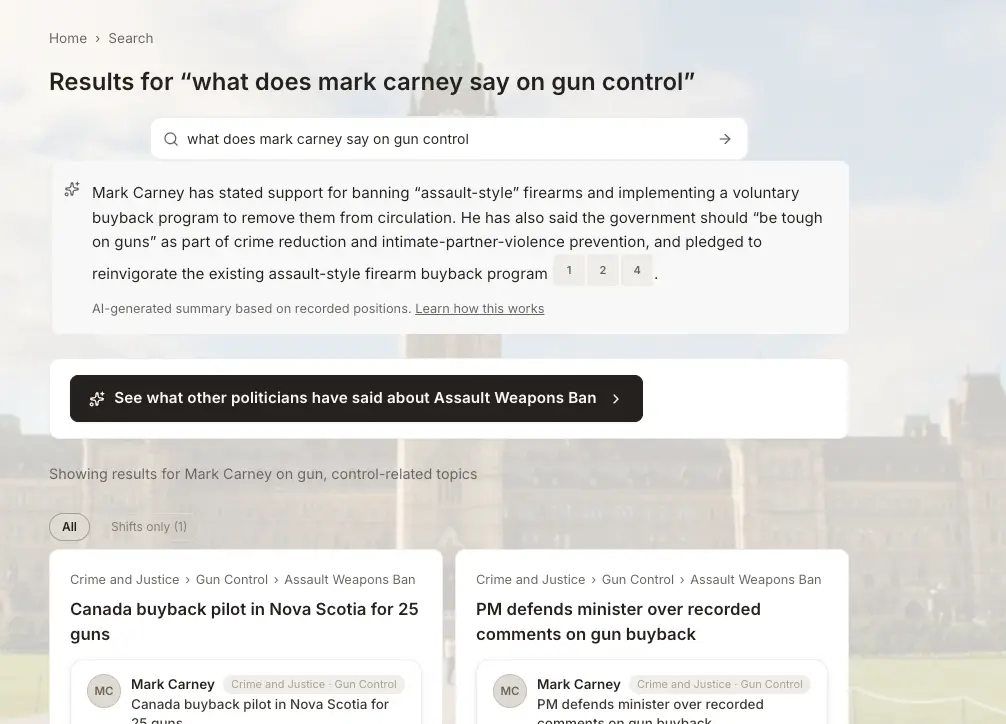
As seen in the screenshot above, the interface includes:
- Direct Quotes: Verified statements from the politician.
- Topic Filters: Related policy areas for further exploration.
- Alternative Stances: A black button to view other politicians' positions on the Assault Weapons Ban.
Regional Data Access
The natural language search covers federal and provincial levels. You can filter your searches or ask questions specific to your region.
How It Works: Technical Overview
The search engine operates on an "implicit ontology." This means the AI understands that political language is a rule-governed game. Words like "the market," "inflation," and "rights" are treated as functional objects within the system.
- Input: User provides unstructured text.
- Mapping: System identifies common language used in the query.
- Synthesis: AI connects the query to structured policy data.
- Verification: The system checks the summary against the database to prevent "hallucinations."

Breaking the Echo Chamber
Traditional algorithms often show you what you already believe. PolicyShift aims to break this cycle. The "Alternative Opinions" button is the centerpiece of this philosophy, encouraging engagement with the full spectrum of Canadian political thought.
Navigation and Filters
The search results page is designed for high information density. You can quickly navigate through several layers of information using breadcrumbs, status indicators, and direct links to politician profiles.
Future Updates
We are continuously refining the LLM summarization tool. Accuracy is our primary metric. We verify summaries against the latest Hansard transcripts and public records.

User Instructions
- Locate the search bar at the top of the page.
- Type a conversational question.
- Read the AI summary.
- Scroll down to view direct quotes.
- Click the "Alternative Opinions" button to see opposing views.
Feedback and Support
We monitor the performance of our natural language search daily. If the system provides an inaccurate summary or misses a key quote, let us know. Your feedback helps calibrate the AI for better accuracy.

